
Install
There are two ways in. The init CLI sets up Vitest or Playwright in one command. Every other adapter takes about two minutes by hand.
Quick start
Section titled “Quick start”Run this in your project root:
npm create executable-stories@latestpnpm create executable-stories@latestyarn create executable-storiesThe CLI reads your project, works out your package manager and workspace layout, asks two or three questions, and writes the adapter, the reporter config, a sample story, and your package.json scripts.
-
It tells you what it found. Package manager, TypeScript, monorepo layout.
◆ executable-stories│ package manager: pnpm│ typescript: yes│ monorepo: yes (3 workspace packages) -
You pick the target packages. Monorepos only. A single-package repo skips this.
-
You pick a framework. Vitest for unit and integration tests, Playwright for end-to-end. Anything already in
devDependenciesis flagged and left alone. -
You approve the plan. Nothing is written until you confirm. The CLI lists every package it will install, every file it will create, and every script it will patch.
Then run your tests:
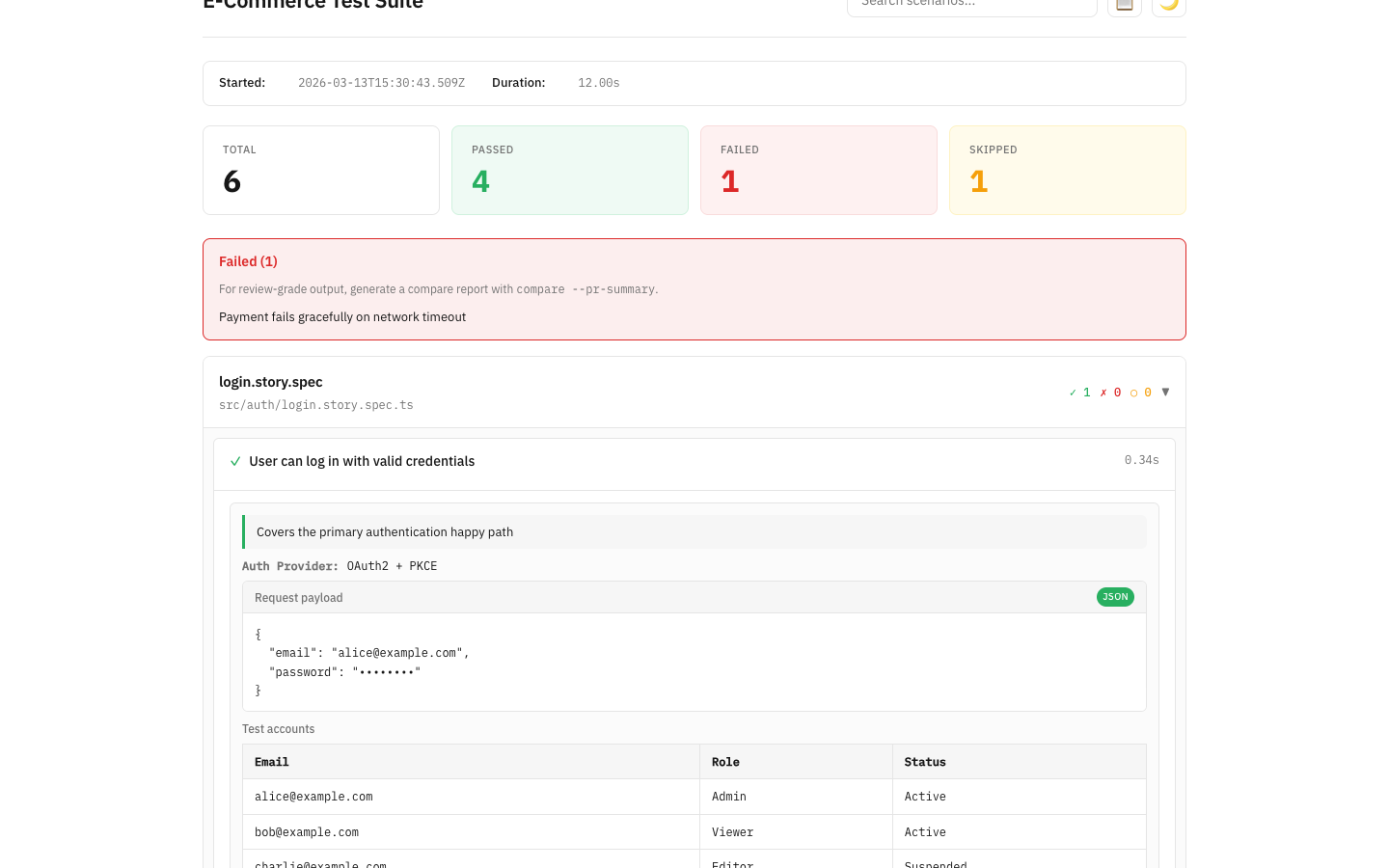
npm testopen reports/executable-stories.htmlpnpm testopen reports/executable-stories.htmlyarn testopen reports/executable-stories.htmlYou get one passing story and two files in reports/. Open executable-stories.html in a browser. Commit executable-stories.md next to your code.
On Playwright, install the browser binaries too:
npx playwright installpnpm exec playwright installyarn playwright installRequirements
Section titled “Requirements”- Node.js 22+
- TypeScript 5.6+
- Vitest 3+
- Jest 29+
- Playwright 1.45+
- Cypress 13+
- pnpm 9+
- npm 10+
- Yarn 4+
Non-JavaScript adapters have their own floors: Go 1.22, Python 3.12, Rust 1.85 (edition 2024), Java 21 with JUnit 5.12, and the .NET 10 SDK with xUnit v3.
Manual setup
Section titled “Manual setup”Pick your framework. The choice follows you across the rest of the docs.
pnpm add -D vitest executable-stories-vitest executable-stories-formattersIn vitest.config.ts, import the reporter from the /reporter subpath:
import { StoryReporter } from 'executable-stories-vitest/reporter';import { defineConfig } from 'vitest/config';
export default defineConfig({ test: { reporters: ['default', new StoryReporter()], },});With no options the reporter writes reports/index.html and keeps one canonical report per test source under reports/by-file/. For Markdown instead, pass formats: ['markdown'], outputDir: 'docs', and outputName: 'user-stories'. See Vitest reporter options.
pnpm vitest runpnpm add -D jest executable-stories-jest executable-stories-formattersIn jest.config.js, add both the setup file and the reporter:
export default { // ... your existing config setupFilesAfterEnv: ['executable-stories-jest/setup'], reporters: [ 'default', [ 'executable-stories-jest/reporter', { formats: ['markdown'], outputDir: 'docs', outputName: 'user-stories', output: { mode: 'aggregated' }, }, ], ],};That writes docs/user-stories.md after the run. See Jest reporter options.
pnpm jestpnpm add -D @playwright/test executable-stories-playwright executable-stories-formattersIn playwright.config.ts, reference the reporter by package path so Playwright resolves it:
import { defineConfig } from '@playwright/test';
export default defineConfig({  reporter: [    ['list'],    [      'executable-stories-playwright/reporter',      {        formats: ['markdown'],        outputDir: 'docs',        outputName: 'user-stories',        output: { mode: 'aggregated' },      },    ],  ],});
That writes docs/user-stories.md after the run. See Playwright reporter options.
pnpm playwright testpnpm add -D executable-stories-cypressCypress runs your tests in a browser, so story metadata travels to Node over cy.task. That takes two wires instead of one.
Register the task in cypress.config.ts:
import { defineConfig } from 'cypress';import { registerExecutableStoriesPlugin } from 'executable-stories-cypress/plugin';
export default defineConfig({  e2e: {    setupNodeEvents(on) {      registerExecutableStoriesPlugin(on);    },  },});
Then import the support file in cypress/support/e2e.ts:
import 'executable-stories-cypress/support';That registers an afterEach which ships the collected metadata to Node.
To render a report, either run Cypress with the Mocha reporter:
cypress run --reporter executable-stories-cypress/reporter \ --reporter-options outputDir=docs,outputName=user-storiesOr call the Module API after cypress.run(): buildRawRunFromCypressResult(result, options), then generateReportsFromRawRun(rawRun, options). Both are exported from executable-stories-cypress/reporter. See Cypress reporter options.
go get github.com/jagreehal/executable-stories/packages/executable-stories-goAdd a TestMain to each package that should produce a report. RunAndReport runs your tests and writes the raw run JSON before exiting:
package mypackage_test
import (  "os"  "testing"
  es "github.com/jagreehal/executable-stories/packages/executable-stories-go")
func TestMain(m *testing.M) {  os.Exit(es.RunAndReport(m))}
It writes .executable-stories/raw-run.json. EXECUTABLE_STORIES_OUTPUT moves it.
Render it with the formatters CLI, which defaults to that path:
go test ./...npx --package executable-stories-formatters executable-stories format --format markdownpip install executable-stories-pytestNothing to configure. The package registers itself as a pytest plugin, so pytest.ini, pyproject.toml, and conftest.py stay untouched. Import and go:
from executable_stories import storyAfter the run, the plugin writes .executable-stories/raw-run.json under pytest’s root directory. EXECUTABLE_STORIES_OUTPUT moves it, resolving relative paths against the project root so the file lands in the same place however you invoked pytest. EXECUTABLE_STORIES_QUIET silences the next: hint on stderr.
pytestnpx --package executable-stories-formatters executable-stories format --format markdowngem install executable-stories-rubyOr add gem "executable-stories-ruby" to your bundle.
For Minitest:
require "minitest/autorun"require "executable_stories/minitest"For RSpec:
require "rspec"require "executable_stories/rspec"
ExecutableStories::RSpecPlugin.install!
Install the plugin once before your specs run, then call story(...) inside describe blocks.
Either plugin writes .executable-stories/raw-run.json after the suite finishes.
npx --package executable-stories-formatters executable-stories format --format markdowncargo add executable-storiesFor OpenTelemetry tracing, enable the optional feature: cargo add executable-stories --features otel.
There is no reporter to register. Import Story and the first one installs a process-exit hook:
use executable_stories::Story;It writes .executable-stories/raw-run.json under the project root. EXECUTABLE_STORIES_OUTPUT moves it, or call write_results() to pick the moment yourself. The file is renamed into place, so a reader never catches it half-written.
A story records pass or fail when it drops. A failing assertion panics, and a story dropped during unwind records fail. A #[test] returning Result is the exception, since Err fails without panicking. Route the fallible call through record_result:
#[test]fn parses_a_price() -> Result<(), std::num::ParseIntError> {    let mut s = Story::new("parses a price");    s.then("the string parses to 499");
    let parsed = s.record_result("499".parse::<u32>())?;    assert_eq!(parsed, 499);    Ok(())}
s.fail() sets the status directly if you would rather branch yourself.
cargo testnpx --package executable-stories-formatters executable-stories format --format markdownGradle (Kotlin DSL):
testImplementation("io.github.jagreehal:executable-stories-junit5:0.1.0")Gradle (Groovy DSL):
testImplementation 'io.github.jagreehal:executable-stories-junit5:0.1.0'Maven:
<dependency> <groupId>io.github.jagreehal</groupId> <artifactId>executable-stories-junit5</artifactId> <version>0.1.0</version> <scope>test</scope></dependency>Requires Java 21 and JUnit 5.12.
Nothing else to configure. StoryTestExecutionListener registers itself through JUnit Platform service discovery, so adding the dependency activates it for the whole run. It writes .executable-stories/raw-run.json once every test has finished, relative to the working directory, which under Gradle or Maven is the project directory. EXECUTABLE_STORIES_OUTPUT sets the path outright. The file is renamed into place, so a watch task always reads a whole document.
./gradlew testnpx --package executable-stories-formatters executable-stories format --format markdowndotnet add package ExecutableStories.XunitRequires the .NET 10 SDK and xUnit v3.
Add the recording attribute once, in any file in the test project:
using ExecutableStories.Xunit;
[assembly: StoryRecording]
That covers every test in the assembly. It runs after each test, reads the outcome xUnit already computed, and records the story with the right status, the failure message, and the test class as its suite. Your tests only call Story.Init and the step methods.
The raw run JSON lands at .executable-stories/raw-run.json under your test project directory when the process exits. dotnet test runs the host out of bin/<config>/<tfm>, so the adapter walks up from the test assembly to the project file rather than trusting the working directory. EXECUTABLE_STORIES_OUTPUT sets the file path and resolves relative paths against that project directory, so it cannot land back under bin/. EXECUTABLE_STORIES_PROJECT_ROOT changes the directory both resolve against.
dotnet testnpx --package executable-stories-formatters executable-stories format .executable-stories/raw-run.json --format markdownInit CLI flags
Section titled “Init CLI flags”The prompts cover everything, so most people never touch these. For CI and agents:
| Flag | Effect |
|---|---|
--vitest / --playwright / --both |
Choose frameworks without prompting |
--target <pkg...> |
Set up specific workspace packages. Pass root for the repo root |
--ts / --no-ts |
Write a minimal tsconfig.json if one is missing |
--yes, -y |
Accept defaults and suppress prompts |
--dry-run |
Print the plan without writing or installing |
--json |
Emit a machine-readable plan and result. Implies --yes |
--force |
Overwrite existing config files that differ |
--interactive |
Force prompts even when stdin is piped |
Non-interactive Vitest setup in a CI script:
pnpm create executable-stories@latest --vitest --yesPreview a monorepo change without touching anything:
pnpm dlx executable-stories-init --both --target apps/web --dry-runPer framework, the CLI adds these to your target’s devDependencies, skipping anything already installed at any version:
| Framework | Packages |
|---|---|
| Vitest | vitest, executable-stories-vitest, executable-stories-formatters |
| Playwright | @playwright/test, executable-stories-playwright, executable-stories-formatters |
Troubleshooting
Section titled “Troubleshooting”My framework wasn’t detected
Section titled “My framework wasn’t detected”The init CLI auto-installs Vitest and Playwright only. Everything else uses the manual setup above.
If Vitest or Playwright is installed but the CLI missed it, check that the package sits in your target’s own devDependencies rather than a parent workspace package’s dependencies.
“exists; use –force to overwrite”
Section titled ““exists; use –force to overwrite””You already have a vitest.config.ts or playwright.config.ts, and the CLI will not clobber it. Either copy the reporter block from the manual setup above into your existing config, or re-run with --force and lose what you had.
Monorepo: it set things up in the wrong package
Section titled “Monorepo: it set things up in the wrong package”Running --yes in a monorepo without --target defaults to the repo root. Re-run with --target apps/web, or just --target web when the name is unambiguous.
I’m driving this from an AI agent
Section titled “I’m driving this from an AI agent”Pass --json for a parseable plan and result:
pnpm dlx executable-stories-init --vitest --target apps/web --yes --jsonYou get one JSON object: { ok, plan: { ops, summary }, result: { written, installed, patched, skipped, notes } }.
For agents that cannot run the CLI, the executable-stories-init skill hands them the same checklist the CLI follows.
It hangs on pnpm add
Section titled “It hangs on pnpm add”Almost always a network problem or a missing pnpm-lock.yaml. Run the install yourself to see the real error: cd <target> && pnpm install. Fix it, then re-run the init CLI.